WoW Forever
One app for WoW Forever
STM plays WoW Forever, for Horde and Alliance, from one app on your Windows PC.
- WoW: Forever
- Coming soonHardcore
- Coming soonFishing
In betaSTM plays from the first level to max level. It is in beta and plays every race and every class on WoW Forever.
Install
Install STM on Windows
STM-Setup.exe is the companion for WoW Forever. The game addon still has to be in the game folder. The installer is the Windows app.
- Get STM-Setup.exe from the Telegram chat. This site does not host the file.
- Start the file. Windows may say it protected your PC. That warning is because the publisher is unsigned.
- Choose More info, then Run anyway.
- If Windows asks for permission, run the installer as administrator.
- On first launch, STM opens beside the game. Sign in with the account you made here, then choose the character plan.
The unsigned-publisher warning is Windows SmartScreen. STM is not signed by a public publisher. You decide whether to run it. The account risk of automating gameplay is in the questions.
Who it's for
For players the grind leaves out
World of Warcraft asks for long sessions of fast, precise key presses. STM is both a leveling tool and an accessibility tool: it takes your character up the levels, and it opens the game to everyone who finds that part hard, painful or simply too long.
Limited mobility and one-handed play
Play WoW with one hand, or with very little movement. STM handles the constant keys and clicks of combat and travel, and you step in whenever you like.
Pain, RSI and fatigue
When WoW with chronic pain or RSI means short sessions, STM carries the repetitive part, so your hands can rest while your character keeps progressing.
Busy lives, little time
Work, family, caring for someone: STM levels your character while you get on with the day, and keeps you posted on your phone.
Anyone tired of the grind
Love the world, not the hundredth wolf? Level up in WoW without grinding for hours, and save your energy for the parts you enjoy.
How it helps
How to play World of Warcraft with limited mobility, in three steps
Install the addon
Add STM's addon to your version of WoW and start the STM companion on your Windows PC.
Choose your character's plan
Pick a race and class that WoW Forever allows. FLEX covers grind leveling. GO and Founder also run a gathering and crafting pair. STM quests a level band when it has a route for it, and grinds when that band has none. Fishing is still coming soon.
Watch, take over, or check from your phone
Let STM play, take the controls back at any moment, or follow along on Telegram from another room.
Features
What the WoW accessibility addon and leveling tool does for you
While it runs, STM plays the repetitive parts of the game. You always see what it is doing, and you can stop it with one key.
Hands-free leveling, all the way to max level
STM walks to enemies and fights them, for every race and every class on WoW Forever, so your character levels while your hands rest. It spends the next talent point on level-up. STM quests a level band when it has a route for it, and grinds when that band has none. Fishing is still coming soon.
A rotation that knows when to retreat
It plays your class's combat rotation, and backs away from a fight it is losing instead of letting you die.
Rest, loot, sell and repair
Between fights it eats and rests, loots, sells junk, repairs your gear and trains your new spells.
Gathering and crafting (GO / Founder)
On GO and Founder, STM pairs a gathering skill with a crafting skill: Mining and Engineering, Herbalism and Alchemy, Skinning and Leatherworking, or Tailoring and Enchanting. FLEX is grind-only and does not include professions. Fishing is still coming soon.
Always know what is NOW and NEXT
An in-game panel says in plain words what STM is doing now, what comes next and the pace.
A dashboard on your PC
Status, pace, vitals, supplies, the route on the map, your gear, talents and spells: everything STM knows, in your browser.
Telegram control from your phone
Status, stop and resume, screenshots, short video clips and a live view, from the sofa or another room.
Instant pause
One press of Pause in the game, or /stop in Telegram, stops STM and releases every key.
See it working
STM at work: the game and the dashboard
Real pictures from a live session. The panel is drawn inside the game, and the dashboard runs in a browser on your PC.
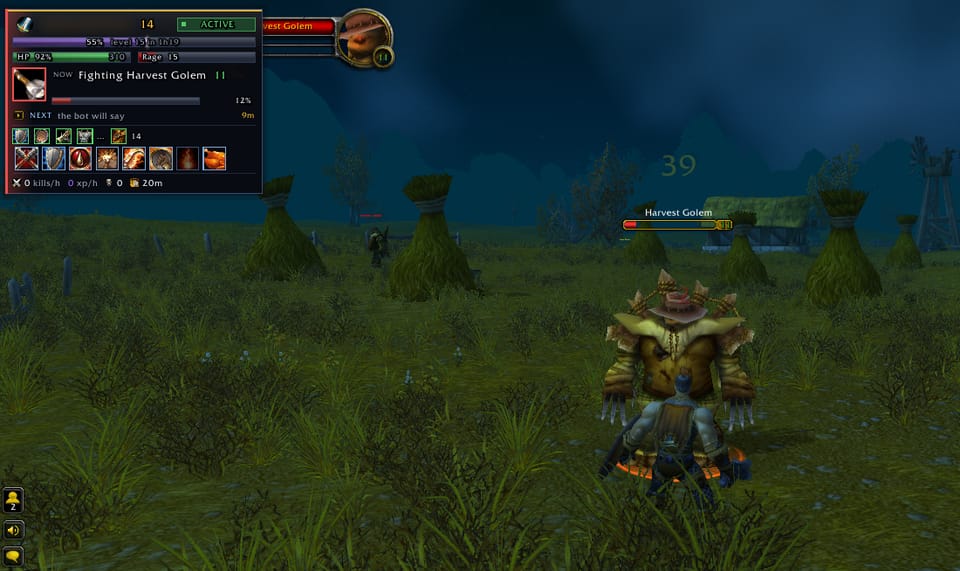
In the game The NOW and NEXT panel sits in the corner of the game and says in plain words what STM is doing and what comes next. 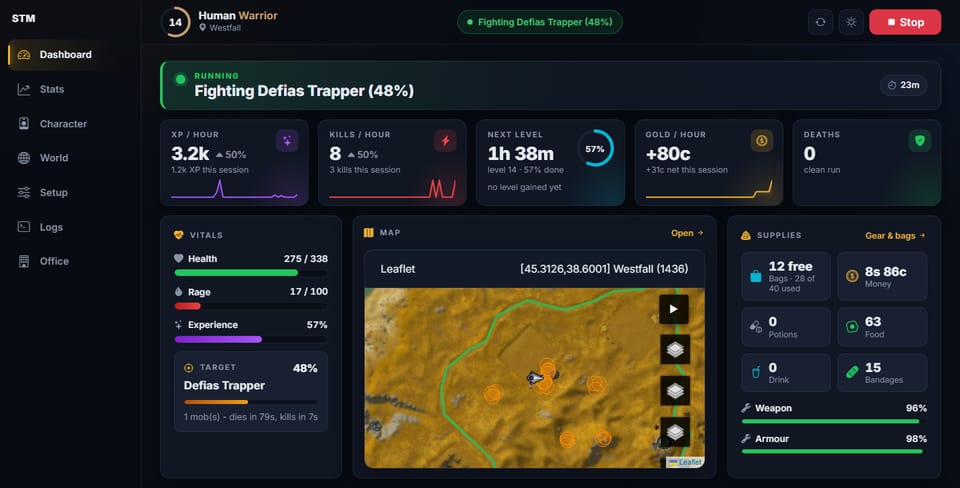
The dashboard Status, pace, vitals, the route on the map and your supplies, live in a browser on your PC. The red button stops STM. 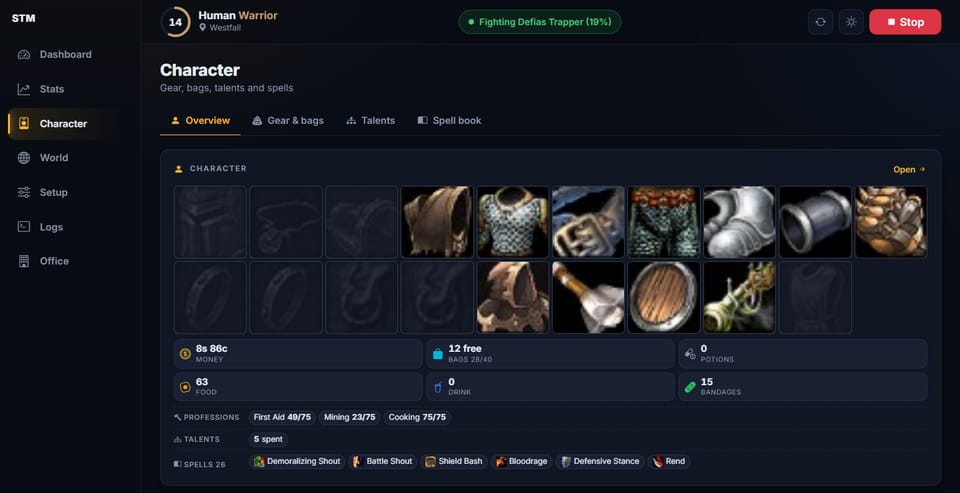
Gear, talents and spells Everything STM knows about the character: gear, bags, professions, talents and spells. 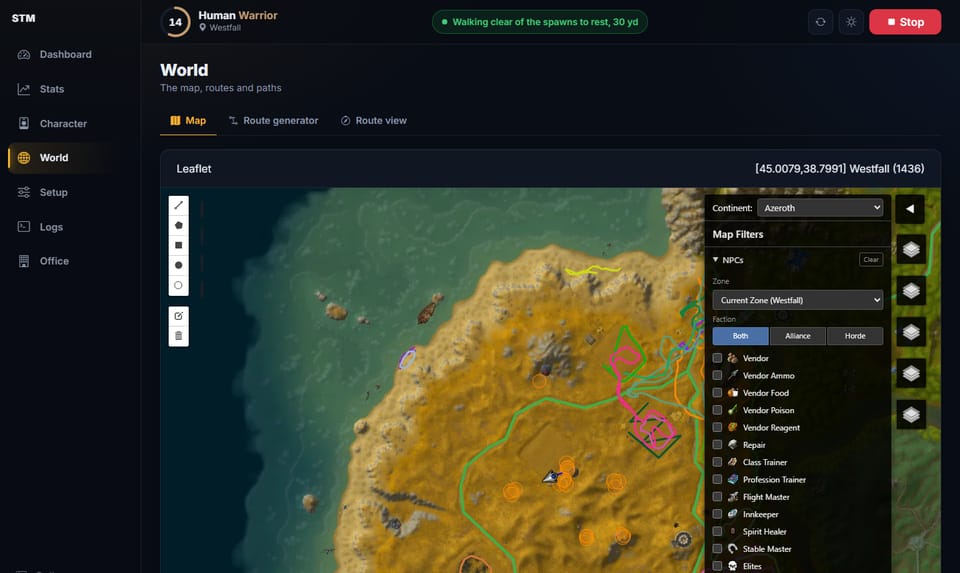
The route on the map Watch where STM is walking, from the sofa or another room.


Game scenes belong to Blizzard Entertainment. These are our own captures of STM at work.
Accessibility
Our accessibility commitment
STM exists so more people can enjoy World of Warcraft. This site follows the same idea: it aims to meet the Web Content Accessibility Guidelines (WCAG) at level AA, works with a keyboard and screen readers, and lets you change text size, contrast, motion and font from the accessibility menu at the top of the page.
If you are a disabled player, you can shape what STM becomes. Tell us what is hard for you, in your own words and at your own pace.
Shape the roadmap on Telegram (opens Telegram in a new tab)- Text size, high contrast, reduced motion and a dyslexia-friendly font
- Full keyboard use, visible focus and screen-reader labels
- Buying needs an account; delivery stays on Telegram.
Feedback
Tell us what would help, on Telegram
Questions before you buy, or ideas once you play? Feedback decides what STM builds next. Answer three short questions in your own words and send them to @HugeKush on Telegram.
Your situation
How you play today, and what gets in the way.
What's hard in WoW for you
The moments that cost you the most effort, pain or time.
What would help most
The one change that would make playing easier.
Feedback template
Hi STM! Feedback from the website.

Your situation:

What's hard in WoW for you:

What would help most:
You write and send this message in Telegram. The page does not send the template for you.